Ask admin for access
Last updated: May 11, 2026
Introduction
Ever found yourself stuck because you couldn’t see a user, template, or contract type — or because you didn’t have permission to perform an action like deleting or uploading a contract?
With the new Ask admin for access feature, you’ll no longer have to guess why or reach out to SpotDraft Support. Instead, you’ll now see a clear explanation of what’s blocking you — along with a built-in option to request access directly from your SpotDraft Admin.
How It Works
Whenever you encounter a permission-related block, you’ll now see an “Ask admin for access” action.
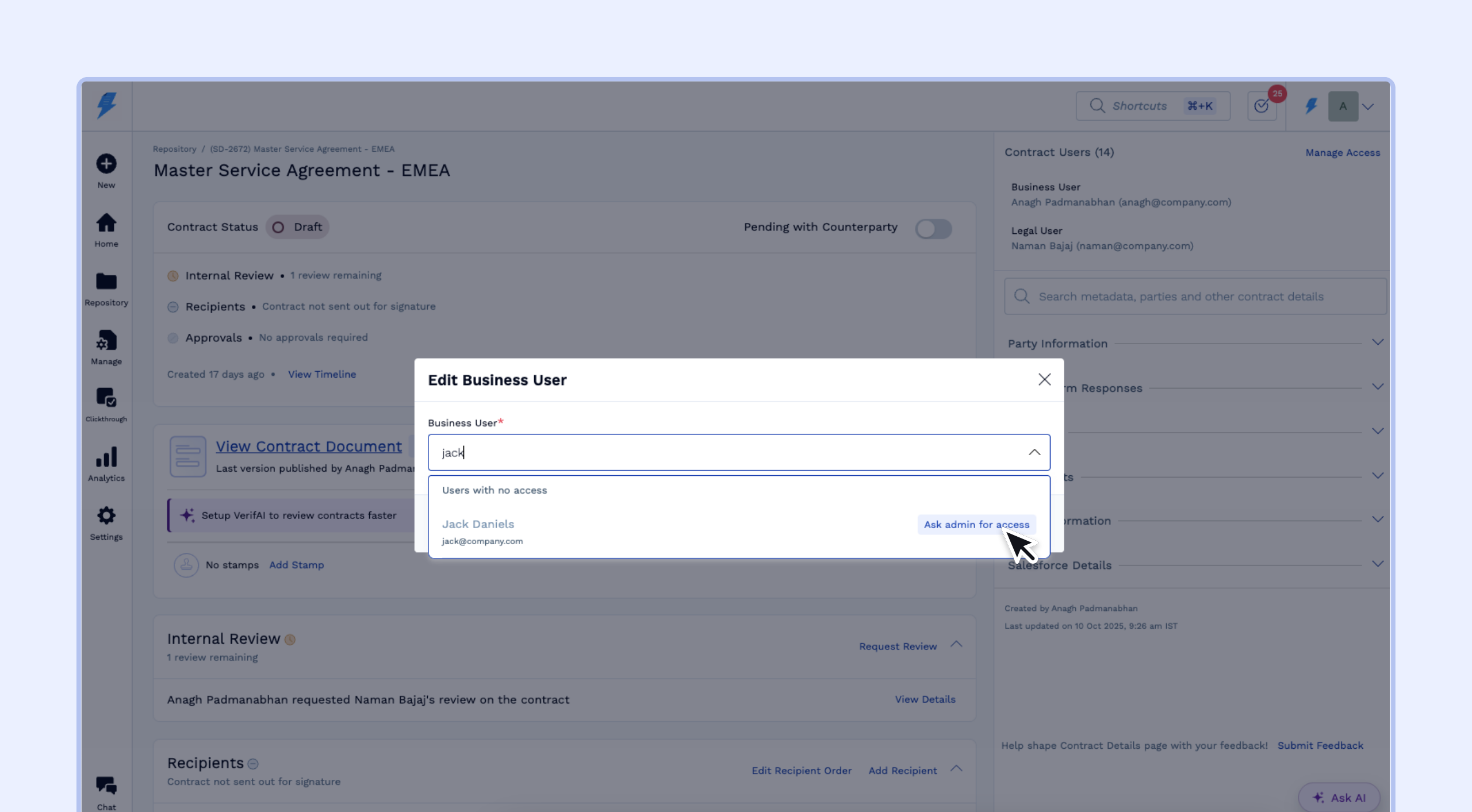
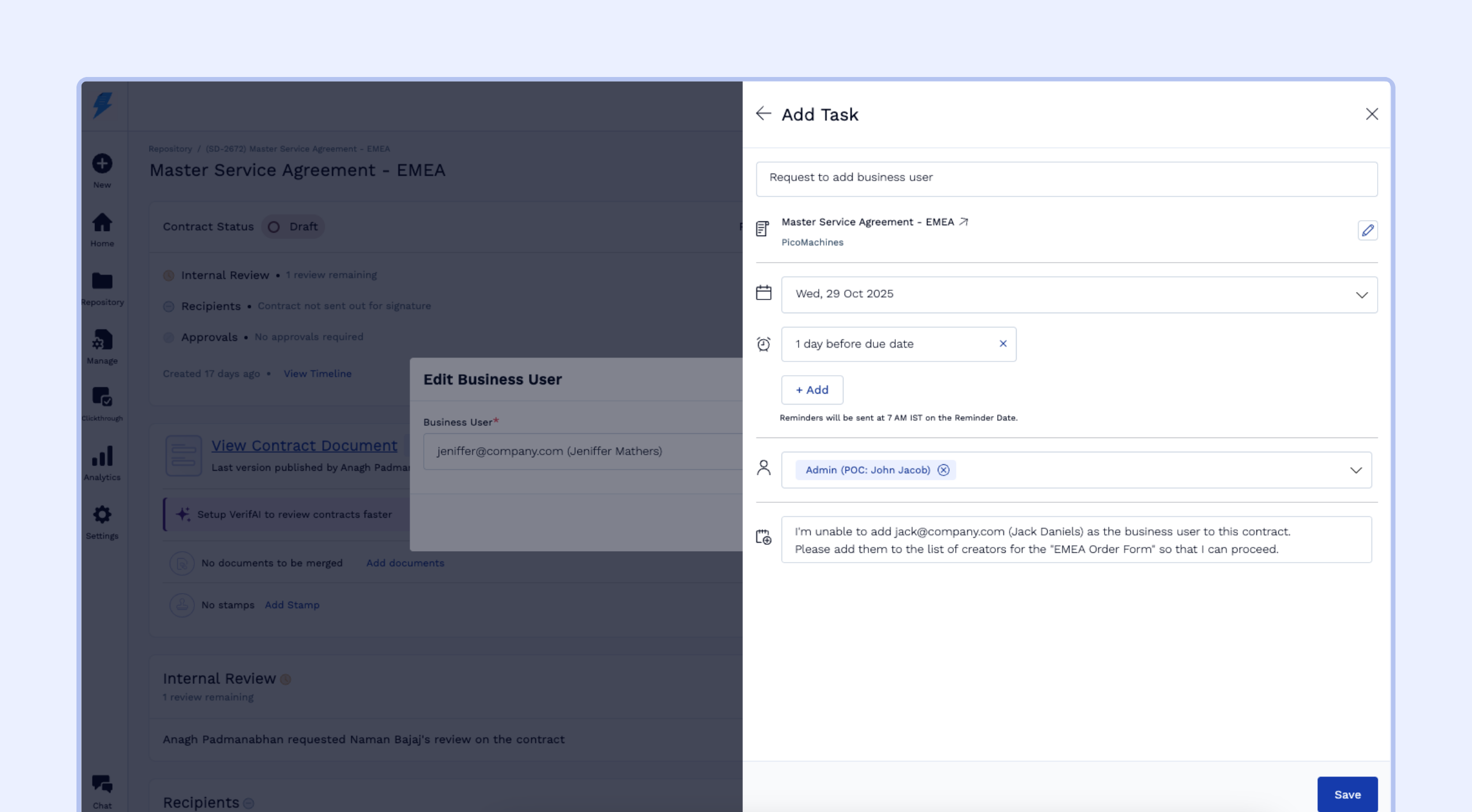
Clicking it automatically creates a pre-filled task containing relevant details about your request. You can review or edit this information before submitting it.
The “Ask admin for access” feature only appears when you can see an option but cannot select or use it due to permissions. If a feature or option is missing entirely from your interface (such as the “Upload third‑party contract” button when you lack Upload Contracts permission), the “Ask admin for access” button will not appear. In these cases, try accessing any available create/contract action to trigger a permission block, or manually identify your workspace admins using the method described below.Important:By default:
The due date is set to 2 days from the time of request.
A reminder is automatically set for 1 day before the due date.
The task is assigned to the Admin team.
Once submitted, your Admins are notified and can take the necessary steps to unblock you.
Where You’ll See It
While assigning users
Updating Business User: Some users cannot be selected as they have not been added as a creator for the contract type.
Updating Legal Reviewer: Some users cannot be selected as they are not added as editors for the contract type.
[Coming soon] Updating Signatory: Some users cannot be selected as they have not been added as a signatory for the contract type.
While creating a contract
Selecting a Contract Type: You cannot select a contract type as you’re not added as a creator for that contract type.
Selecting a Template: You cannot select a template as you have not been added as a creator for the contract type linked to that template.
While managing contracts
[Coming soon] Performing actions like delete, download, or upload a new version: You cannot perform this action as your team doesn’t have the required permission enabled.
Cannot access a contract link: Trying to access a contract using a link takes you to a 404 page, as you do not have access to that contract or because the contract link is incorrect.
No results in repository based on filter: You do not see any contracts based on your search filters, as you don't have viewer access to any contracts which match the criteria.
When “Ask Admin for Access” Is Not Available
If you need permissions but cannot see the “Ask admin for access” option (because the feature you need is missing entirely from your interface), you can manually identify your workspace admins:
Hover over the Settings icon and select Access Control
Navigate to the Teams tab
Search for “Admin” in the search bar
Click on the Admin team to view its member list on the left side
Contact any member from this list to request the permissions you need
If you are unable to access this page or your Access Control permissions are restricted, please reach out to your immediate manager to identify the appropriate workspace admin.
Understanding SpotDraft Permission Scope Limitations
While the new "Ask admin for access" feature helps you request permissions when blocked, understanding the scope limitations of different access levels can help you determine what type of access you actually need and avoid unnecessary permission requests.
Troubleshooting Permission Issues
If you have the appropriate permissions configured but still cannot upload contracts or access features, try these troubleshooting steps:
Log out and log back in: Sign out of your workspace completely and then log back in.
Clear browser cache: Clear your browser cache before logging back in to ensure you're not working with outdated permission data.
Refresh team membership (for admins): If access issues persist after the above steps, try removing the affected user from their team (e.g., Commercial team) and then re‑adding them. This can help refresh permissions when everything appears correctly configured.
If these steps don’t resolve the issue, use the “Ask admin for access” feature to submit a formal request, or manually contact your workspace admins using the method described in the “When “Ask Admin for Access” Is Not Available” section above.
Creator Access Limitations
Creator access to a contract type allows you to create new contracts and view contracts you've created, but does not grant access to view or edit contracts created by other users. To access contracts created by others, you need Viewer or Editor access explicitly granted for that contract type.
What this looks like in practice: When creating a contract, you’ll only see contract types in the selection dropdown for which you have Creator access. For example, if you only have Creator access to “Training Workflow,” that will be the only option visible when selecting a contract type, even though your workspace may have many other contract types configured. To access additional contract types, your admin needs to grant you Creator access via Settings > Access Control > Contract Types.
Repository Visibility with Creator Access
Repository count discrepancy: You might see only a few contracts in your repository view while a colleague with Viewer access sees the full set, because Creator access only shows contracts you directly created or reviewed.
Shared link access issues: Direct contract links shared with you may return “blocked” or 404 errors if you lack Viewer access to contracts you didn’t create.
When to request Viewer access: If you frequently need to reference contracts created by others, ask your admin to grant Viewer access via Settings > Access Control > Contract Types to see the complete repository.
Review Assignment vs. Commenting Workflows
When you need someone to provide input on a contract, there are two different approaches with different permission requirements:
Formal Review Assignment (requires Editors access): Assigns a formal review task to the user; User appears in the contract's review workflow; Requires the user to have Editors access to the contract type.
Commenting Workflow (requires only Viewers + Suggesters access): User can view the contract and add comments/suggestions; No formal review assignment needed; Notify the user via activity log or direct communication; Much lower permission threshold.
When to Request Different Access Levels
Request Viewer access when you need to see contracts created by others but don't need to edit them
Request Editor access when you need to make changes or be assigned formal reviews
Request Creator access when you need to create new contracts of a specific type
Consider Viewers + Suggesters as an alternative to Editors when you only need commenting capabilities
Deleted Contracts Triggering Access Requests: When trying to access a deleted contract via a direct link, the “Ask admin for access” feature may appear even for admin users with proper permissions. If you encounter the access request prompt unexpectedly and suspect the contract may be deleted, navigate to Repository → Deleted view and search for the contract ID to verify if this is the cause.
This feature helps streamline access-related requests, reducing back-and-forth and support tickets while giving users a simple, guided way to get unblocked faster.