Understanding Contract Stages in SpotDraft
Last updated: May 12, 2026
SpotDraft streamlines contract management by organizing them through various stages. Each stage represents a specific step in the contract lifecycle, from initial creation to final execution. This article will guide you through the primary contract stages within SpotDraft:
Contract Stages:
Draft:
This is the initial stage for creating template contracts.
The "Draft" stage is only available for template contracts.
Pre-send approvals can be collected at this stage.
Redlining:
This stage represents active contract negotiation.
Redlining involves exchanging versions of the contract between you and the counterparty, with edits and comments being made.
Pre-sign approvals are collected for contracts at this stage.
Intake form responses can be edited while the contract is in this stage by opening the contract header → Edit → Edit Intake Form Responses
Signing:
This stage represents the final step before the contract is executed.
You'll set up the signature blocks in this stage.
Once set up, you can send it to all recipients to sign the contract.
Intake form responses cannot be edited while the contract is out for signature
Executed:
The contract is considered officially executed when all signatures are collected.
The contract is placed on hold when it's not actively being worked on. This can happen for various reasons, such as waiting for additional information or addressing the staleness of the deal with the counterparty., and intake form responses cannot be edited while a contract is in this stage
This stage is useful for pausing a contract while awaiting further information or actions.
Voided:
The contract is marked as void when it is no longer valid. This could happen if the deal falls through.
Any state except "Executed" can be moved to "Voided."
Once a contract reaches the "Executed" stage, it cannot be voided. The only option for removing an executed contract is to permanently delete it from the Repository.
How to Transition Between Contract Stages:
Draft to Redlining:
For template contracts, the contract transitions to redlining when the contract is shared with the counterparty for review.
Redlining to Signing:
For template contracts, the contract transitions to signing when pre-sign approvals are collected.
For template contracts without pre-sign approvals, the contract transitions to signing when the counterparty's review is complete.
For third-party paper contracts, the contract transitions to signing when all the redlines have been resolved & pre-sign approvals are collected.
While SpotDraft allows moving contracts between most stages, there are important irreversible transitions that users should be aware of:
Draft to Redlining Limitation
Once a contract moves from Draft to Redlining, it cannot be moved back to the Draft stage.
If you need to make changes to a contract in Redlining, edit the contract directly rather than reverting to Draft.
Executed Stage Finality
Critical: Once a contract reaches the Executed stage, it cannot be moved back to any previous stage, even by administrators or from the backend. This is due to compliance and audit requirements.
Recovery Procedure for Accidentally Executed Contracts
Navigate to the contract and click “View Version History” at the top.
Hover over the required document version and click “Download”.
Create a new contract using the downloaded document.
Signing to Executed:
Once the contract is signed by all the necessary signatories, it transitions to the "Executed" stage.
Signing back to Redlining:
If you need to make changes after sending a contract for signature, you can move it back to Redlining
Navigate to the contract and click "More Actions" → "Move Back to Redlining"
Note: This will void any existing signing links that were sent out
Redlining to Executed (Alternative Path):
For legacy contracts or contracts signed outside SpotDraft, you can move directly from Redlining to Executed without going through the Signing stage.
Upload a new version of the contract in PDF format and select 'Executed by all parties' during the upload process.
Once uploaded, the contract will automatically transition to Executed status.
Important: Once a contract reaches the Executed stage, it cannot be moved back to any previous stage. Ensure the contract is ready to be executed before using this alternative path.
Uploading Additional Versions to Already-Executed Contracts: If you need to add a fully-signed document to a contract that is already in Executed status (such as corrected/final files or renewal documents), you can upload it as a new executed version. Upload the new version in PDF format and select "Executed by all parties" during the upload process to record it on the same contract record.
FAQs
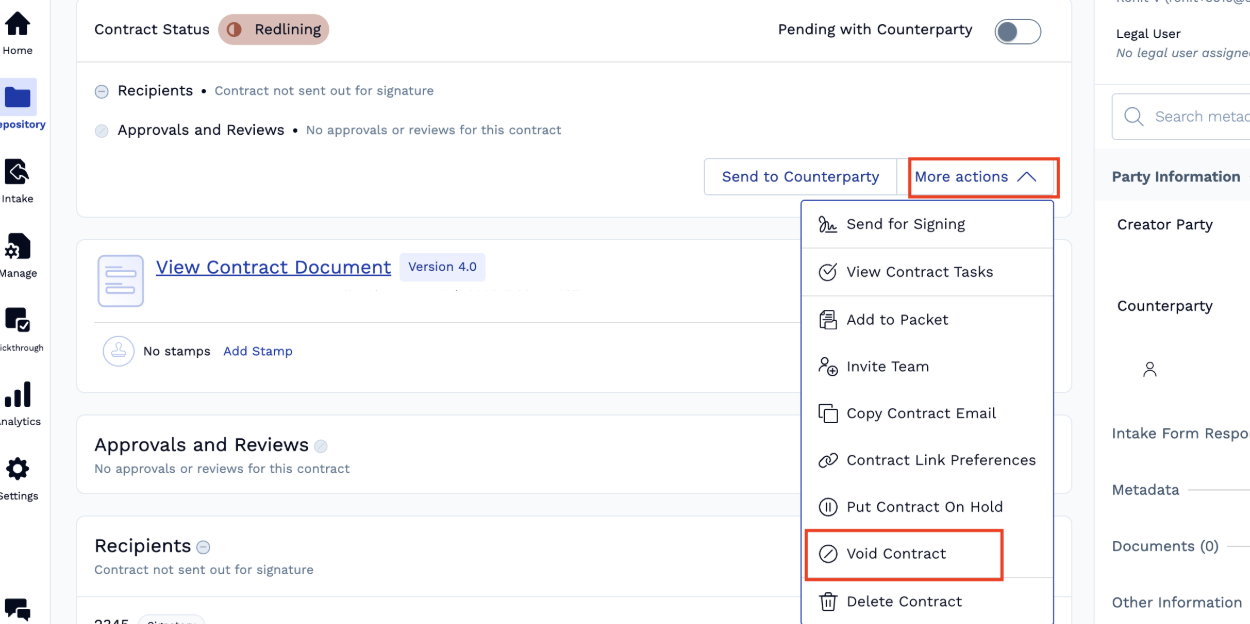
How do I cancel/void a workflow for a contract?
To cancel a workflow of a contract at any point, you need to void the contract. This will stop the entire workflow and prevent anyone from proceeding with any actions on that contract.
Follow these steps:
Navigate to the contract you want to cancel/void
Click on "More Actions" in the contract interface
Select "Void Contract" from the dropdown menu