Setting Up Approval for Contracts Executed Offline
Last updated: March 27, 2026
This guide explains how to configure a specialized approval that triggers specifically when an executed contract version (signed outside of SpotDraft) is uploaded to an existing contract record. This approval for contracts executed offline is crucial for maintaining compliance and ensuring legal validation before a contract is officially marked as executed in your system.
What is Approval for Contracts Executed Offline?
The Approval for Contracts Executed Offline feature ensures that contracts signed outside the platform are subject to mandatory legal or compliance validation. Historically, when a user uploaded a signed contract version and marked it as executed by all parties, the system automatically bypassed any remaining pending approvals and marked the contract as executed.
This new functionality introduces a mandatory approval step that triggers only when a user attempts to upload a fully executed (offline-signed) version of a contract. This closes the compliance gap, ensuring critical review occurs before the contract is officially recorded as executed.
How to Configure Approval for Contracts Executed Offline in a Workflow
This approval is configured within the Workflow Manager, ensuring it is a mandatory step for all contracts created through that specific workflow.
Navigate to Approvals and Reviews
Go to Manage > Workflow Manager and select the workflow you wish to edit.
In the left-hand menu, under Additional Options, click on Approvals and Reviews.
Add a New Approval Step
Click Add Approval. This will open the configuration modal.
Define Basic Details
Approval name: Give it a clear name (e.g., "Offline Contract Validation," "Final Signed Copy Check").
Approval description: Clearly instruct the approver on what to verify (e.g., "Require approval to verify the uploaded contract is properly executed before finalizing.").
Set the Approval Trigger
Under the "When is this approval required?" section, select the new option:
Contract marked as executed
When you select this option, you will see an informational banner indicating that this approval resets automatically whenever a new uploaded version is marked as fully executed.
Tip: This approval acts as a final step. We recommend placing this approval at the end of any sequential approval/review flow to avoid inadvertently skipping subsequent tasks.
Assign the Approver
Under "Who should approve?", select the user or team responsible for compliance or final legal validation (e.g., the Legal Operations team).
Set Restrictions (Optional)
Configure the Restrict Actions section to control who can skip this approval, download the contract, or send it to counterparties while this critical validation step is pending.
Save and Publish
Click Save to finalize the approval step.
Click Publish New Changes on the workflow details page to activate the new rule.
Review and Approve: The user reviews the uploaded contract version (ensuring all signatures and execution details are correct). Note that SpotDraft does not automatically detect changes or edits in the uploaded document—the approver must manually verify that the executed version matches the expected contract terms. To compare versions and identify changes, use the version comparison feature from the contract's version history.
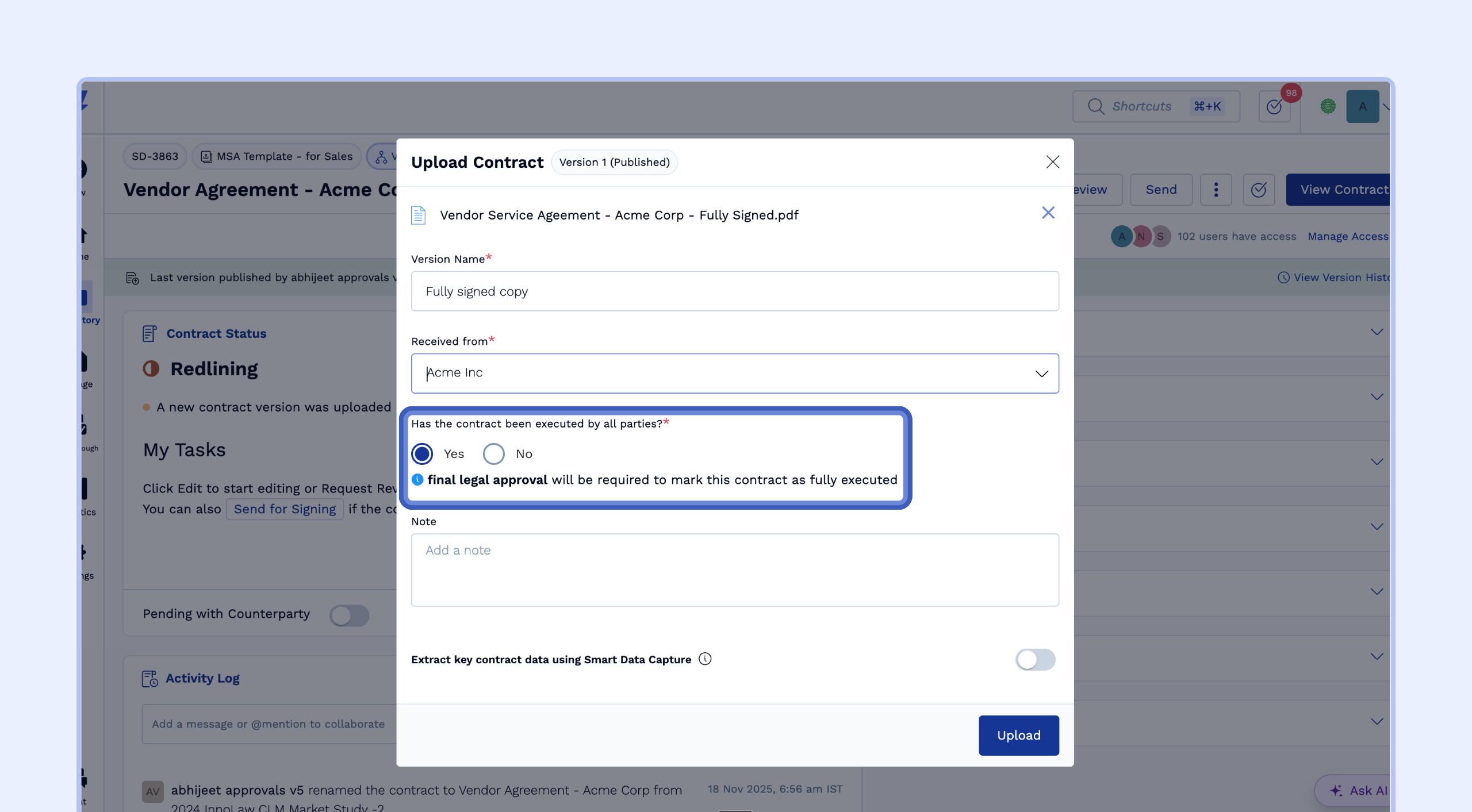
Start the Upload:Upload New VersionTrigger the Approval:"Has the contract been executed by all parties?"Yes
Approving will mark the contract as Executed. Verify all signatures and other contract details before confirming.Note:Note: