Editing Contracts with Microsoft Word for Desktop in SpotDraft
Last updated: May 8, 2026
Want to edit your contracts in Microsoft Word for improved performance or to work offline? SpotDraft now lets you seamlessly edit and save your contracts directly in Word!
This guide will walk you through the process of using the "Edit in Microsoft Word for Desktop" feature, which enables you to work on Word with your contracts. You can also navigate through the entire flow yourself here.
Who is this guide for?This guide is for SpotDraft users who edit contracts, specifically editors and legal users.
Pre-requisites:
Users should have Microsoft Word installed on their devices.
Users should have an active license for Microsoft Word.
How to edit a contract using Microsoft Word on your device:
Navigate to the Contract Record:
Go to the Contract Record for the contract you want to edit.
Click the "Edit" button:
You'll see the "Edit" button.
Select "Edit with Microsoft Word":
From the menu that appears, choose "Edit with Microsoft Word".
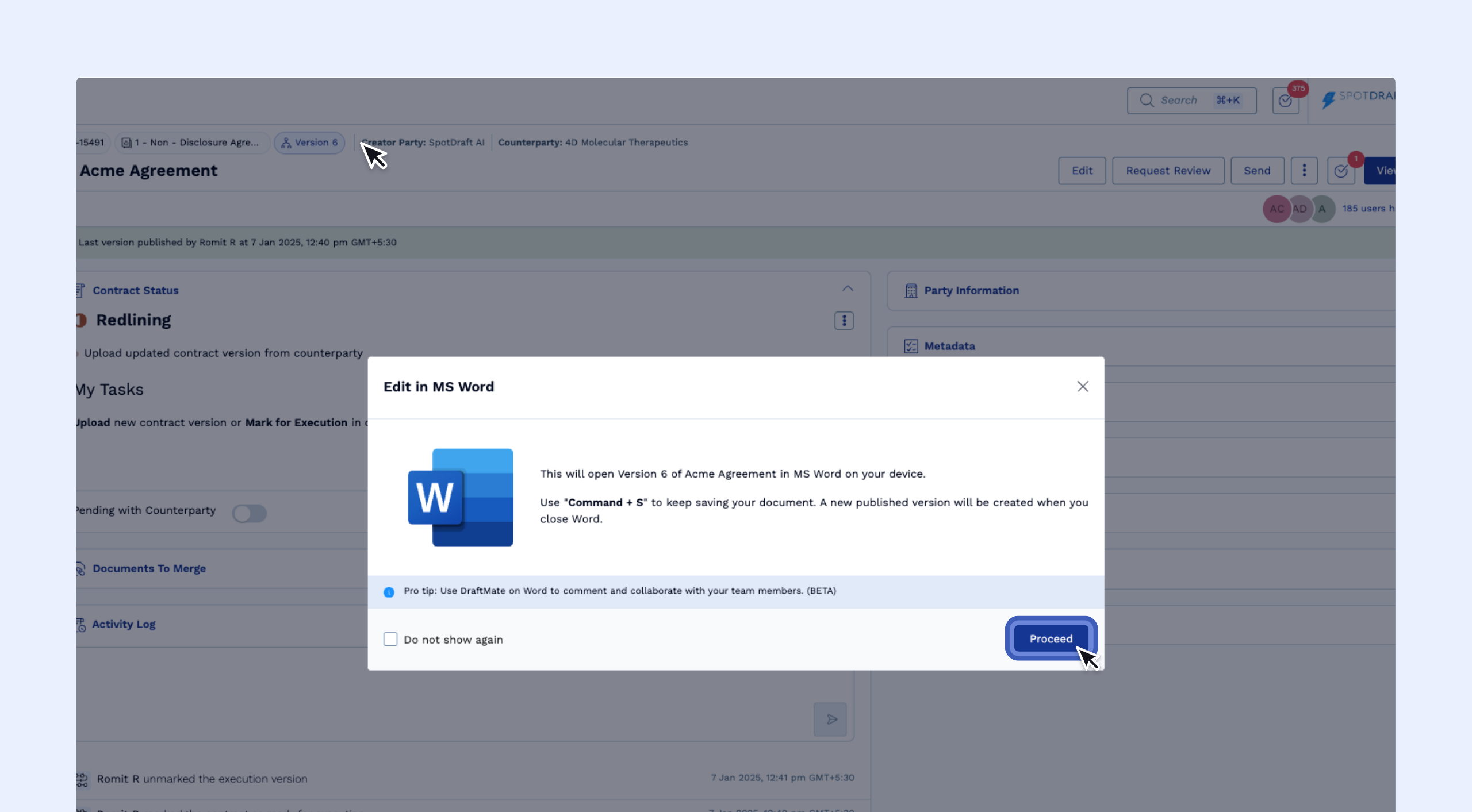
This will open a pop-up window.
Click "Proceed":
Click "Proceed" to open the document on MS Word.
The contract will open on Microsoft Word on your device.
The Summary Page will show that a user is actively editing the document with a yellow banner.
Make your edits to the contract in Word.
Troubleshooting: Locked Out After Word Fails to Open or Crashes
If you click "Proceed" but Microsoft Word doesn't open on your device, or if Word crashes while you're editing, you may find yourself locked out of the contract. This happens because SpotDraft registers an active editing session even if Word failed to launch properly or crashed unexpectedly.
To resolve this immediately:
Completely quit Microsoft Word (not just close the document)
Restart your computer to ensure all Word processes are closed
Reopen the contract link in SpotDraft and refresh the page
The editing lock should now be cleared and you can resume editing.
If the above steps don't work:
Wait for the editing session to end automatically due to inactivity (typically after a period of no activity)
Once the session ends, you'll be able to start a new editing session
If you need immediate access and the above steps don't resolve the issue, contact SpotDraft support for assistance
Note: The yellow banner on the Summary Page indicates an active editing session. If you see this banner but aren't actively editing in Word, the session will automatically end after a period of inactivity.