Contract Activity Timeline
Last updated: January 29, 2026
The Activity Timeline feature provides detailed insights into contract processing times, helping you track the duration of different stages in your contract lifecycle.
Finding Activity Timeline Information
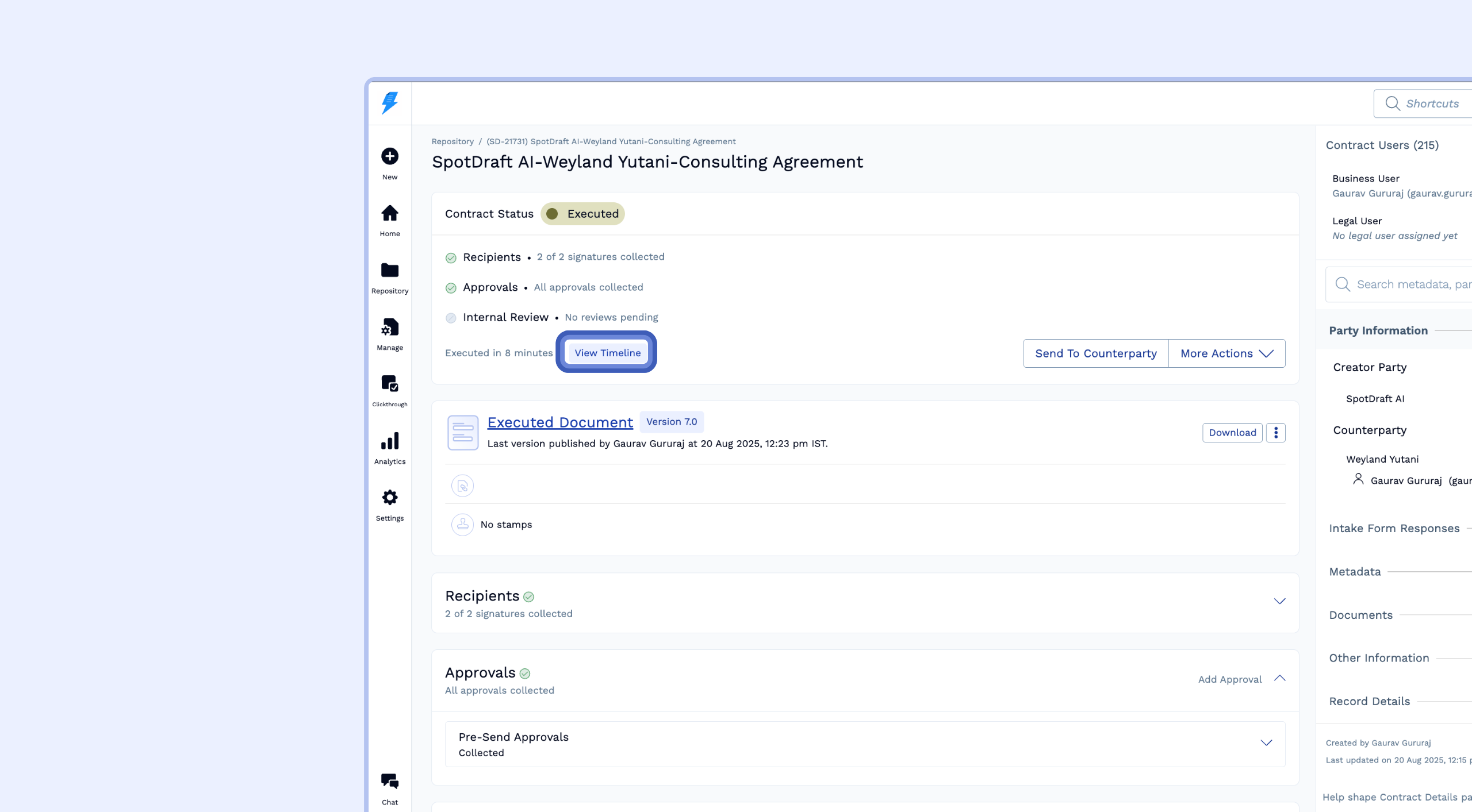
Step 1: Locate the Activity Timeline Strip
Navigate to your contract in SpotDraft
Look for the Activity Timeline information strip
For non-executed contracts, you'll see how long ago the contract was created
For executed contracts, you'll see how much time was taken for execution
Step 2: View Detailed Time Analytics
Click on the "View Timeline" button in the Activity Timeline section
Wait for the charts to load
The system will display comprehensive time tracking data for your contract
Understanding the Time Analytics Dashboard
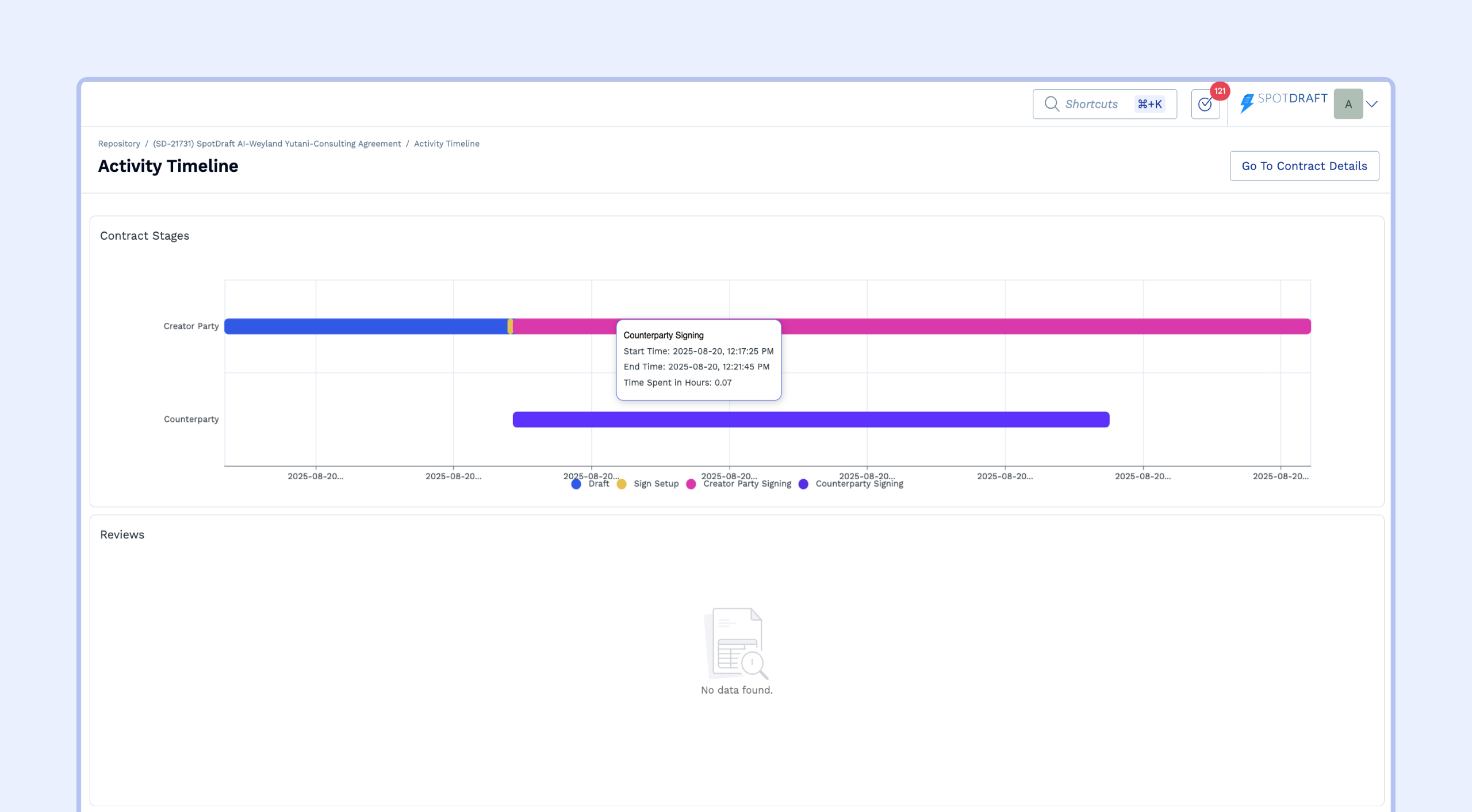
Contract Stages Overview
The Contract Stages section shows the progression of your contract through different phases:
Creator Party Activities:
Draft Stage: Time spent in initial contract drafting
Example: 61 hours in draft stage
Redlining: Time spent on contract revisions and modifications
Example: 345 hours in the redlining stage
Sign Setup: Time spent by your team to send the contract for signing after the approvals are complete
Creator Party Signing: Time taken for your company to sign
Counterparty Activities:
Counterparty Review: Time required for the other party to complete review
Example: 35 hours to complete the review process
Counterparty Signing: Time required for the other party to complete signing
Example: 191.4 hours to complete the signing process
Reviews Section
Track review completion times and efficiency:
View individual reviewer performance
See the time taken for each review completion
Example: 9.7 hours to complete a specific review
Monitor review bottlenecks and processing speed
Approvals Tracking
Monitor the approval workflow:
Visual Legend: Shows the status of all approvals
Green/Approved: Completed approvals
Other colors: Rejected or pending approvals (when applicable)
Detailed Information: Hover over approval items to see:
Start times
End times
Total time spent
Example: 300 hours for a particular approval to be completed
Signatures Overview
Track signing progress across all parties:
Status Indicators:
Completed: Shows signatures that have been finalized
Pending: Displays outstanding signatures awaiting completion
Detailed Metrics:
Individual signer performance (e.g., "Completed in less than an hour")
Outstanding signature duration (e.g., "Pending for 191.48 hours")
Party-specific tracking for multi-party contracts
Interactive Features
Hover Details
Hover over any chart element to see detailed timing information
View start times, end times, and duration for each stage
Get precise metrics for performance analysis
Visual Legend
Color-coded status indicators for quick identification
Clear differentiation between completed, pending, and rejected items
Consistent visual language across all sections
Best Practices
Performance Monitoring
Regularly review turnaround times to identify bottlenecks
Compare similar contracts to establish benchmarks
Use data to optimize your contract workflow
Process Improvement
Identify stages with consistently long turnaround times
Focus on streamlining high-impact delay points
Track improvements over time using historical data
Notes
Missing Data
Data might take up to 15 minutes to load. For previously executed contracts, data will be up to date, but for more recently executed and in-flight contracts, a 15-minute delay is expected. If it is taking longer, please reach out to help@spotdraft.com.
Historically Executed Imported Contracts and Clickthrough Contracts
Activity Timeline is not supported for these contract categories. Historically executed contracts cannot display timeline data because no activity on them happens in SpotDraft.