Out of Office: Set Up
Last updated: November 25, 2026
When you are away, contracts sent to you for signature can stall. Set your out of office in SpotDraft so colleagues know you are away, and pick a delegate to sign in your place.
Beta: Out of office is enabled per workspace. If you do not see Out of office hours in your profile, contact your Customer Success Manager.
Overview
With out of office, you can:
Set the dates you are away and add a short message for colleagues
Pick a colleague to receive signing tasks sent to you while you are away
Change your end date or message at any time
Remove an out of office before it starts, or end it early once it has started
Senders see an out-of-office badge next to your name when they pick signatories. To learn what senders and delegates see, read "OOO: Signature Task".
Before you start
Any member of your workspace can set their own out of office. You can only set it for yourself. Admins cannot set it for you.
Set your out of office
Step 1: Open your profile.
Step 2: Find Out of office hours. It sits under your name.
Step 3: Select 'Set out of office'. The form opens.
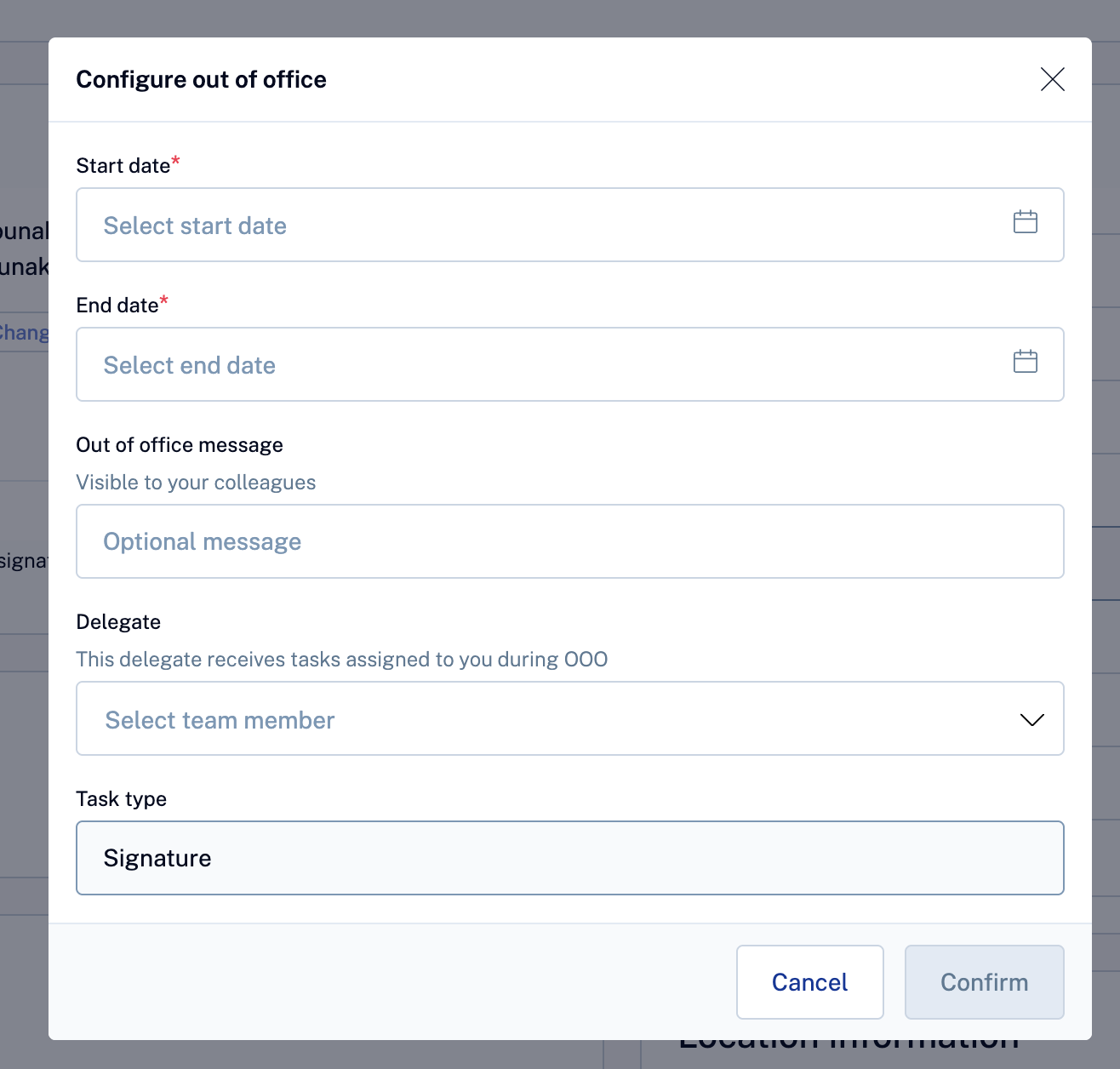
Step 4: Choose a Start date and an End date. Both are required.
Step 5 (optional): Add an Out of office message. For example, "Contact Sam for urgent matters." Colleagues see it when they hover over your badge.
Step 6 (optional): Pick a delegate. Pick the colleague who will act on your behalf, while you are OOO.
Step 7: Select Confirm.
Your profile now shows your OOO dates, delegate and message.
SpotDraft notifies your delegate that they have been picked. See Notifications below.
Form rules
Field | Required | Rules |
|---|---|---|
Start date | Yes | Today or later, up to 366 days ahead. |
End date | Yes | On or after the start date, up to 366 days after it. |
Out of office message | No | Up to 150 characters. |
Delegate | No | An active member of your workspace. Your delegate cannot be out of office on any of your dates. |
Task type | Fixed | Set to Signature. OOO supports only signature task type today. |
If the colleague you pick is out of office during your dates, SpotDraft shows an error: "The chosen delegate already has an out-of-office window in this period." Choose another colleague or change your dates.
How dates work
Dates are whole days. You cannot set a time of day.
Dates follow your browser's timezone.
Your out of office starts at the beginning of your start date, in your browser's timezone. If you pick today, it starts as soon as you select Confirm.
From 7 days before your start date, senders see Upcoming OOO next to your name.
Edit your out of office
Step 1: Open your profile. Your out of office shows under your name.
Step 2: Select Edit. The Configure out of office form opens with your current details.
Step 3: Make your changes and select Confirm.
What you can change depends on whether your out of office has started.
Field | Before it starts | After it starts |
|---|---|---|
Start date | Can change | Locked |
End date | Can change | Can change |
Message | Can change | Can change |
Delegate | Can change | Locked |
To change your delegate after your out of office has started, end it, then set a new out of office with the new delegate.
SpotDraft notifies your delegate when you edit your out of office. If you change or remove your delegate, your previous delegate is told they are no longer covering for you.
Remove or end your out of office
Remove it before it starts
Step 1: Open your profile and select Remove.
Step 2: In the Remove out of office dialog, select Remove.
Your out of office is cancelled and your delegate is told they are no longer covering for you.
End it early
Step 1: Open your profile and select End.
Step 2: In the End out of office dialog, select End.
After you remove or end it, your profile shows Set out of office again.
If you do nothing, your out of office ends after your scheduled end date.
What happens while you are away
When someone sends a contract for signature and you are a signatory from your organisation, your delegate receives the signing task in place of you.
Your delegate gets access to the contract. You keep previous access, so you can still access it.
The signing task does not appear in your Task Center. It appears in your delegate's Task Center, under Sign.
The contract's Activity Log records that the task went to your delegate.
If you set out of office without a delegate, nothing is rerouted. Senders see your OOO badge and decide what to do.
What is not delegated
Contracts already out for signature when your out of office starts stay with you. Delegation happens only when a contract is sent.
Other task types: Only signing tasks are delegated. Other task types will be included soon.
DocuSign AES: Workspaces with DocuSign AES (advanced electronic signature) enabled do not get delegation functionality.
Counterparty signatories: Delegation applies only to signatories from your organisation.
Delegate unavailable: If your delegate is out of office, or is no longer an active member of your workspace, when a contract is sent, the signing task stays with you.
What happens when your out of office ends
Your badge is removed and senders see your name as usual. New contracts sent for signature come to you again.
Signing tasks routed to your delegate stay with them after your out of office ends. They do not return to you automatically. To move a task back, reassign the task back to yourself on the contract.
SpotDraft notifies your delegate. If your out of office runs to its end date, SpotDraft notifies you too.
To see which contracts went to your delegate, use the Out of Office filter in the Repository.
Notifications
Notifications are sent by email and in Slack.
Event | You | Your delegate |
|---|---|---|
Out of office set | No | Yes |
Out of office edited | No | Yes |
Out of office removed before it starts | No | Yes |
Out of office starts | Yes | Yes |
You end it early | No | Yes |
It ends on its end date | Yes | Yes |
If you change or remove your delegate, they are informed of the change.
If your out of office starts on the day you set it, you and your delegate get the start notification right away. Your delegate also gets the notification that they have been picked.
Your delegate does not get a separate out-of-office notification for each contract routed to them. They get the usual signing request email.
FAQ
Can my delegate decline?
No. Your delegate is notified but does not need to accept. Align the expectations with them before you go.
Can one person cover for several colleagues at once? Yes. There is no limit. Each task shows who it was delegated from.
I forgot to set my out of office before leaving. Can I start it today? Yes. Pick today as the start date. Your out of office starts as soon as you select Confirm. Contracts already sent to you stay with you.
Can an admin set my out of office for me? No. You set out of office for yourself only.
Does SpotDraft pick up my out of office from my calendar or directory?
No. You need to set it in SpotDraft.
I do not see the Delegate field. Your workspace uses out of office without delegation. To turn delegation on, contact your Customer Success Manager.
Need help? Contact help@spotdraft.com.