OOO: Signature Task
Last updated: November 25, 2026
When a colleague is out of office, SpotDraft shows it when you pick them as a signatory. If they have set a delegate, contracts you send for signature go to the delegate during their out of office. This article explains what senders see and how delegates find and sign the tasks.
Beta: Out of office is enabled per workspace. If you do not see out-of-office option in the profile or the Out of Office filter in the Repository, contact your Customer Success Manager.
Overview
With out of office enabled, you can:
See who is out of office, or about to be, before you send out a contract
See who will sign in place of an out-of-office signatory
As a delegate, find and sign tasks you are covering in Task Center
Find delegated contracts in the Repository
To set your own out of office, read Out of Office: Set Up
See who is out of office before you send
Where you pick or review signatories, look for these badges next to a colleague's name.
You see | What it means |
|---|---|
Upcoming OOO | Their out of office starts within the next 7 days. |
OOO | They are out of office now. |
If the signatory has a delegate, this line shows under their name on the contract's Recipients card:
[Name] is OOO until [date]. Email for signatures will be sent to the delegated recipient: [Delegate].
If you send via Send for signature, the line also shows in the 'Manage recipients' and 'Review and send' steps.
If there is no delegate, the contract goes to the signatory as usual. Review the badge and message to decide whether to pick someone else.
There is no separate notification. The badge and the recipient line are how you find out.
What happens when you send
Delegation happens at the moment you send a contract for signature. For each signatory from your organisation who is out of office and has a delegate, SpotDraft replaces them with their delegate.
This applies to:
Send for signature
Third-party paper
Contracts created from templates
Contracts signed with Adobe Sign or DocuSign
Express contracts and Campaigns
Situation | What happens |
|---|---|
Signatory is out of office with a delegate | The delegate receives the signing task. |
Signatory is out of office without a delegate | The signatory receives the task as usual. |
The delegate is already a signatory on the contract | You cannot send until you fix the recipients. The Send for signature button is disabled with the message "Duplicate signatory from out of office delegation. Update recipients to continue." |
Contract was already out for signature when out of office started | The task stays with the original signatory. Delegation happens only when a contract is sent. |
Your workspace has DocuSign AES (advanced electronic signature) enabled | Delegation does not apply. The task stays with the original signatory. |
The delegate is out of office, or no longer an active member of your workspace | Delegation does not apply. The task stays with the original signatory. |
You cannot choose to send to the out-of-office signatory instead of their delegate. If you need the original signatory, wait until their out of office ends or ask them to end it.
Find and sign a delegated task
When a colleague picks you as their delegate, SpotDraft notifies you by email and in Slack. You do not need to accept.
Step 1: Open Task Center. Select the check icon in the top bar.
Step 2: Go to Sign.
Step 3: Look for tasks labelled Delegated from: [Name]. A second line reads OOO from [start] to [end]. These tasks sit alongside your own tasks.
Step 4: Open the task and sign as usual.
You get access to the contract when the task is delegated to you.
If you cover for several colleagues, each task shows who it came from.
Signing tasks routed to you, stay with you after your colleague's out of office ends. They do not return automatically. To move a task back, reassign the task on that contract.
Track delegation in the Activity Log
The contract's Activity Log records each delegation.
Signing task sent to the delegate
Delegate signs
Find delegated contracts in the Repository
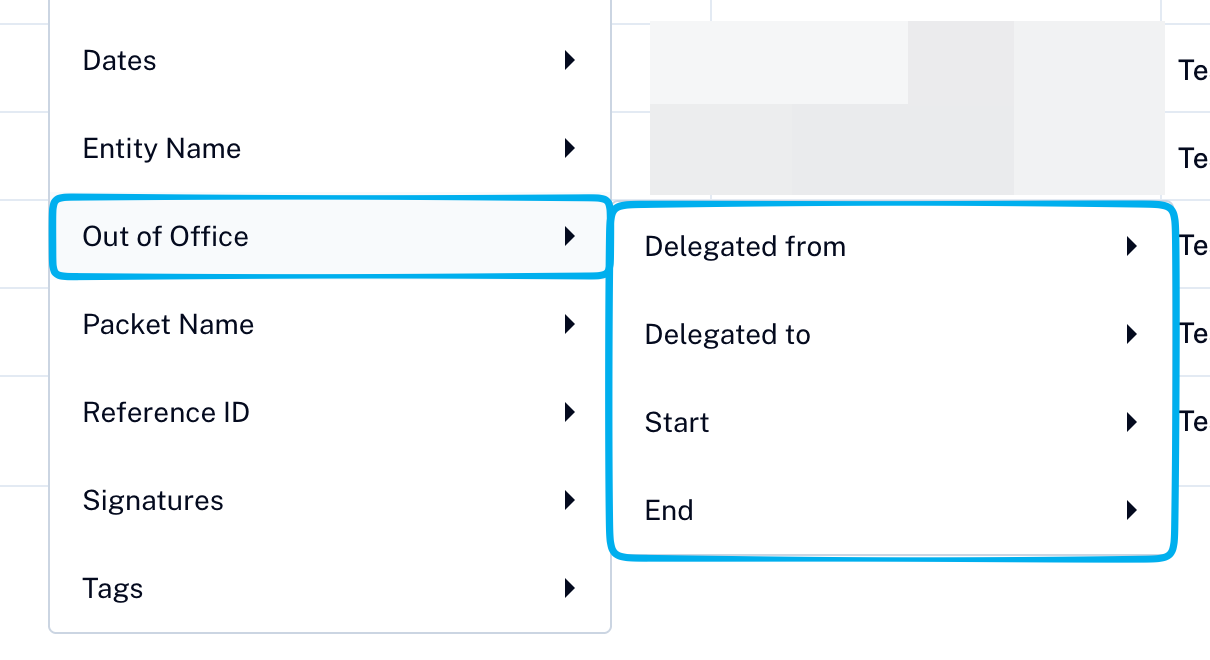
Use the Out of Office filter in the Repository to find contracts by Delegated from, Delegated to, Start and End.
To see what went to your delegate while you were away, filter Delegated from by your own name. To see what you are covering for others, filter Delegated to by your own name.
Points to Note
Only signing tasks are delegated.
Delegation happens only when a contract is sent. Contracts already out for signature when the out of office starts stay with the original signatory.
Signing tasks routed to a delegate stay with the delegate after the out of office ends. They do not return automatically.
Delegation for a single send cannot be overridden.
Workspaces with DocuSign AES (advanced electronic signature) enabled do not get delegation.
FAQ
I sent a contract and the signatory went out of office afterwards. Will it move to their delegate? No. Delegation happens only at send. The task stays with the original signatory.
Does the original signatory still see the contract? Yes. They keep view access.
Two signatories on my contract are out of office and have the same delegate. What happens? SpotDraft blocks the send and shows: "Duplicate signatory from out of office delegation. Update recipients to continue." Edit or remove one of the out-of-office signatories to continue.
Why is there no badge for a colleague I know is away? They may not have set an out of office in SpotDraft, or the feature may not be turned on for your workspace.
Need help? Contact help@spotdraft.com.