SpotDraft Home
Last updated: April 8, 2026
SpotDraft Home is your personalized page in SpotDraft for managing contracts efficiently. It provides a clear overview of your tasks and contracts, helping you stay organized and prioritize your work.
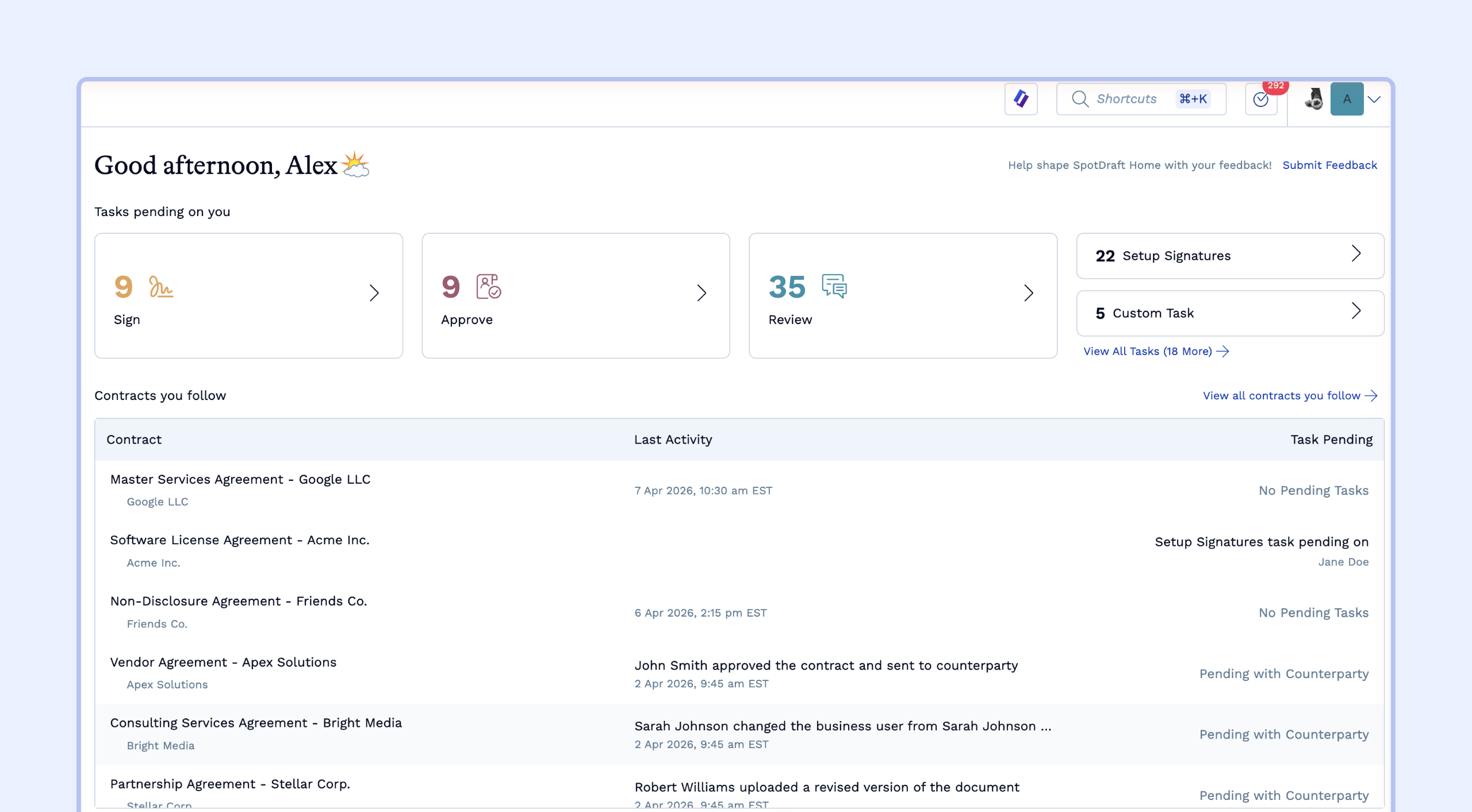
Widgets
SpotDraft Home uses widgets to display information. These are the current widgets:
Tasks Widget: Shows your pending contract-related tasks.
Contracts Widget: Displays contracts you are actively involved in, categorized by their status.
Tasks Widget
This widget helps you track and manage your contract-related tasks. In this widget, you'll see the following task categories:
Signatures Pending on You: Shows the number of contracts that require your signature.
Approvals Pending on You: Shows the number of contracts that need your/your team's approval.
Reviews Pending on You: Shows the number of contracts that await your review.
Setup for Signatures: Shows the number of contracts that need to be prepared for collecting signatures.
Custom Tasks: Shows the number of custom tasks that have been assigned to you.
Clicking on any of these task categories will take you to the Task Center, where you can view and manage the respective tasks.
Contracts Widget
The Contracts widget (Contract you follow) keeps your most relevant work front and center. This widget surfaces any contract where you are an active participant, ensuring you never lose track of a deal in progress.
What makes you a "Follower"?
SpotDraft uses an automated system to determine which contracts appear on your homepage. You are automatically added as a follower whenever you have a meaningful interaction with a contract, including:
Assignment: Being assigned as a reviewer, approver, or signatory. Or if you are a legal user or business user on a contract.
Active Collaboration: Editing document content, commenting on the contract, or being @mentioned in a comment or the activity log.
Communication: Sending the contract for review/signature or responding to a contract-related email.
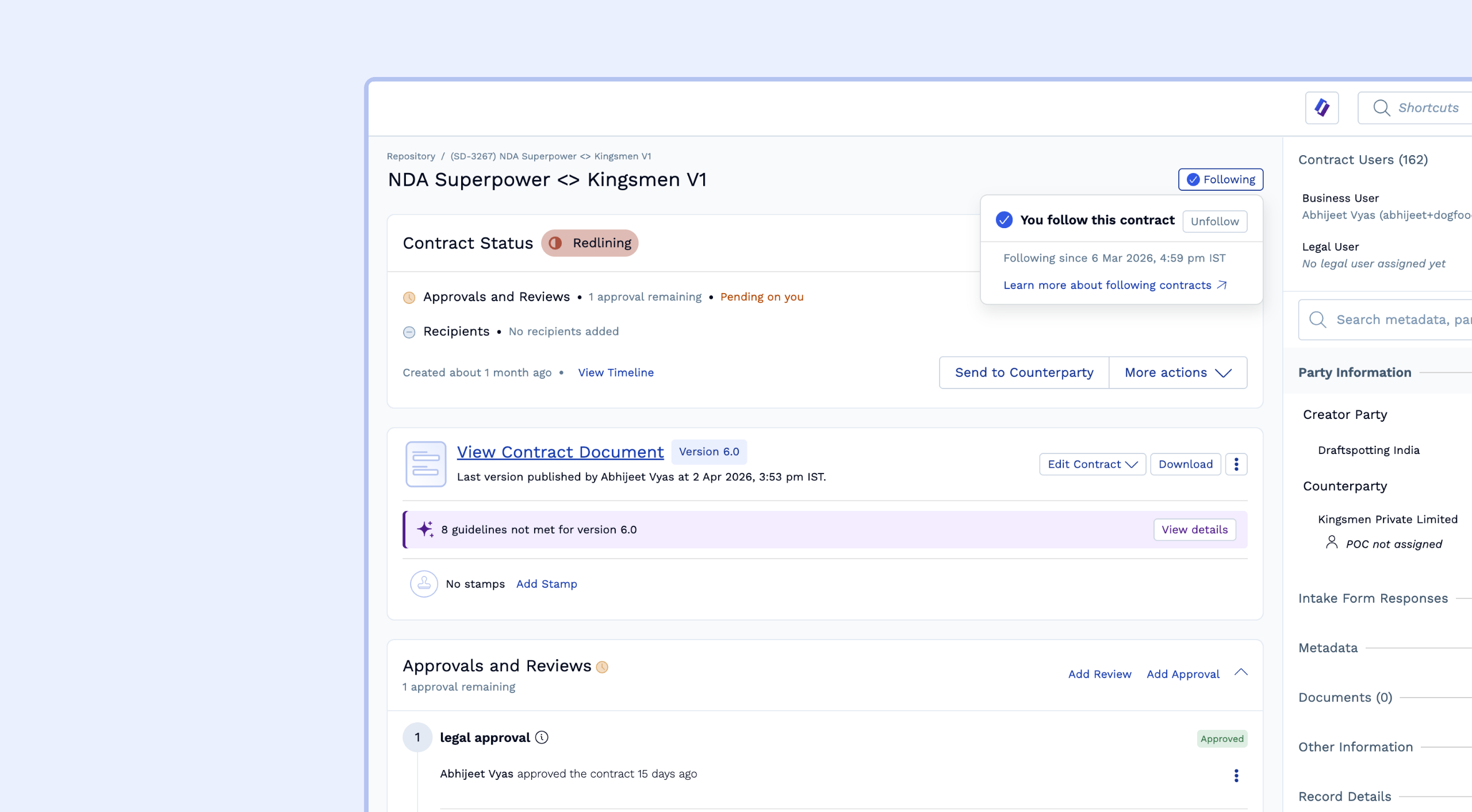
Manual Following: You can manually follow any contract you have access to by clicking the Follow button on the top right of the individual Contract Details Page.
Permanent Followers (Business and Legal Users)
Certain roles are considered essential to the contract's lifecycle. Therefore, the Business User and the Legal User are added as followers by default.
How to Unfollow a Contract
If you were added as a follower through a one-time interaction (like a comment or a specific task) and no longer need to track the contract, you can manually opt out:
Navigate to the specific Contract Details Page.
In the top right actions menu, click the Following button.
Select Unfollow.
Note: Unlike other participants, Business and Legal users cannot be removed from the followers list and will continue to follow the contract as long as they hold that role. This ensures that the primary owners always have visibility into the contract's progress on their homepage.
Taking Action
SpotDraft Home is designed for quick action. You can:
Click on any task in the Tasks Widget to go directly to the relevant contract and complete the task.
Access the full Task Center for a complete list of your tasks. Learn more about the Task Center here. The Task Center provides a more detailed view of your tasks, like this:
Click on any contract in the Contracts Widget to view its details and take any necessary action.
Need More Help?
For detailed instructions on how to search for specific contracts or actions, check out our guides: