Following Sidebar's work with the thinking block
Last updated: November 18, 2026
While Sidebar works on your request, it shows what it is doing in a thinking block. You can follow along as it runs and open the block at any time to see what was done. The thinking block is available in Sidebar v3, for chats started from 18 November 2026. Earlier chats do not show it.
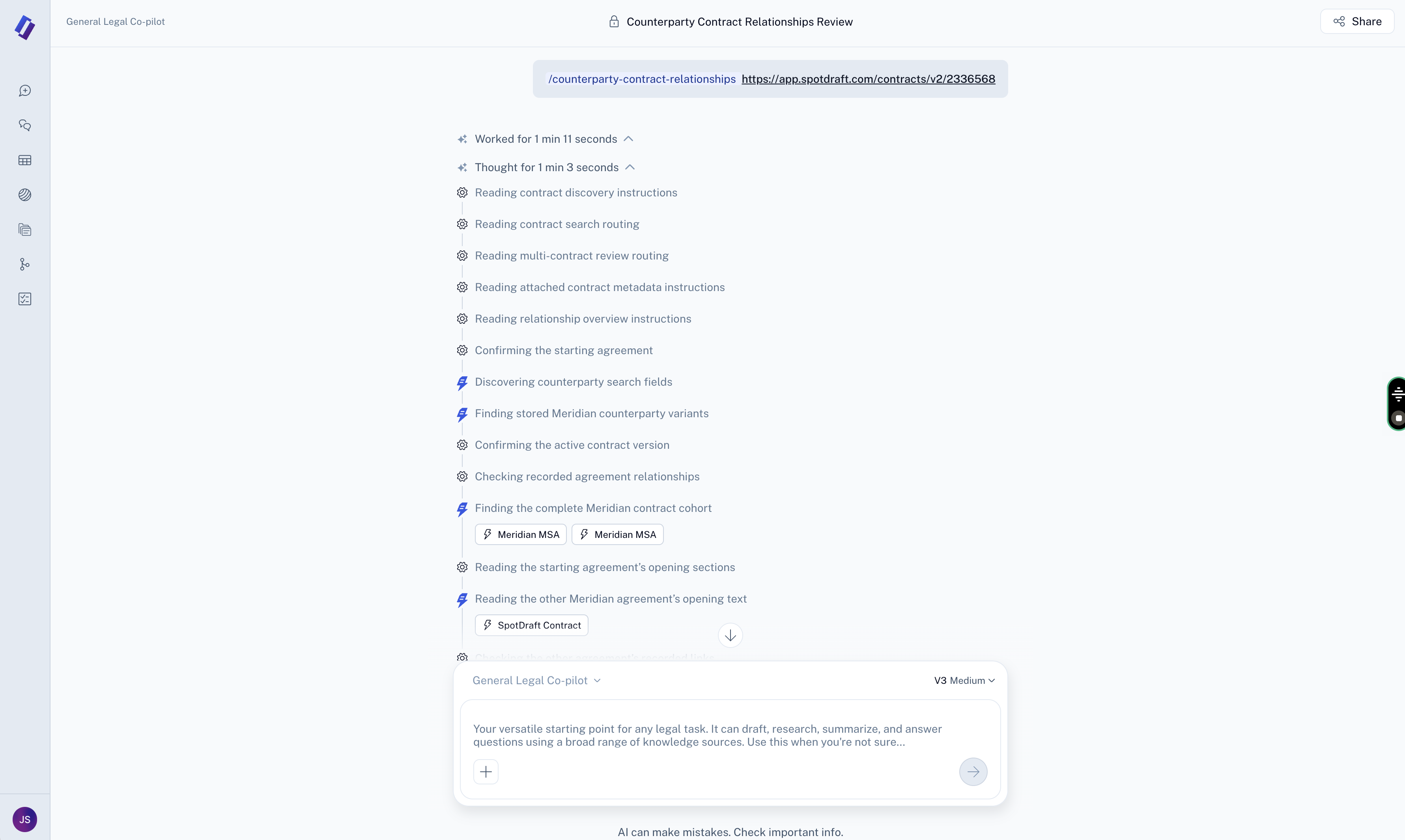
What you see while Sidebar works
Collapsed: the header shows what Sidebar is doing right now, for example "Checking recorded agreement relationships". If no step has started yet, the header reads "Show thinking".
Expanded: the header reads "Hide thinking" and every step is listed, one short line each.
Finished: the header reads "Thought for" followed by how long the work took, for example "Thought for 1 min 3 seconds". When a run has several blocks, they are grouped under "Worked for" followed by the total time, for example "Worked for 1 min 11 seconds". Both can be opened.
How steps are written
Each step is one short line that describes the action, such as "Reading contract search routing" or "Confirming the starting agreement".
A step keeps the same wording from start to finish. Its icon shows whether it is still running or done.
When Sidebar hands part of the work off, the step reads "Delegating" followed by what the work is for.
When Sidebar writes or runs code, the step reads "Writing code" or "Running code". The code itself is not shown, and the output comes back in Sidebar's reply.
Where Sidebar's explanations appear
Sidebar's own explanations, questions and results appear as normal chat text before, between or after blocks. They are never listed as steps inside a block.
What is not shown
Internal housekeeping steps are hidden, so every step you see is work done for your request.
If a chat is interrupted
If a chat stops or hits an error partway through, everything shown so far stays visible and the block freezes in place instead of looking like it is still working.